

Nobody wants to spend hours recording only to discover something awful has crept into the audio. Whether you’re tracking vocals, podcasts, interviews, or instruments, a solid mic test is the difference between “that was easy!” and “can we salvage this?” Testing isn’t about paranoia—it’s the acoustic equivalent of checking your tire pressure before a long drive.
There are dozens of tiny gremlins waiting to trip you up: hum, buzz, weird reflections, plosives, or an input that’s way too hot (or whisper quiet). Instead of crossing your fingers, you take five minutes upfront to make sure you aren’t recording preventable problems.
As detailed by the digital audio experts at Buzzsprout, the most crucial pre-recording check is setting the Mic Level (Gain) correctly on your interface or mixer: speak at your normal volume and adjust the gain until the meter peaks in the -10dB range. This provides a healthy signal that avoids the risk of clipping (distortion) while still being loud enough to be cleaned up later.
Why a Proper Mic Check Matters
Anyone who’s been through enough recording sessions knows this: The mic and its environment are never “set and forget.” Even if yesterday was fine, today might find a loose connector, a noisy cable, a moved stand, or a pop filter that’s mysteriously gone missing. Quick tests:
- Sniff out hums, hisses, or random crackles that hide until playback
- Reveal stand vibrations, cable thumps, or plosives before they become nightmares in editing
- Confirm your gain is Goldilocks—just right, with no ugly clipping or lost details
- Prevent surprises from hardware changes, new cables, or swapped USB ports
If you nail this step, later fixes become tweaks, not panic moves.
The Real-World Steps for Testing Your Mic
- Give It a Look: Scan your microphone—check for dings, dusty grills, loose screws or connectors.
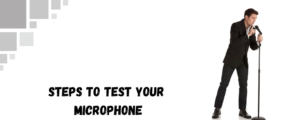
- Plug Everything In: Connect to your mixer, interface, or direct recorder. Gently wiggle the cable and connector to catch tricky shorts.
- Set Your Stand & Filter: Position the mic on a stand. Check the height, clamp tightness, and see if the pop filter or windscreen is in place.
- Level and Gain: Speak or play at your normal volume. Adjust gain until you peak around -12 to -18dB, a safe sweet spot for most work.
- Silence Sweep: Time 15s room silence record. Hear hum, HVAC whine, computer fans, far traffic or any sound that your ears are used to but the sound is picked by the mic.
- Real Use Demo: Spout some words, play, sing or tap out your rhythm as you will play. Change position, move different positions and distances.
- Playback and Adjust: Don’t just watch meters—play it back at a real volume. Are there spots that jump in level, odd noise, or any sharp spikes? Adjust and repeat.
If something feels wrong, trust your ears and adjust before the session gets rolling.
Product Picks
5 Core Model 608 Dynamic Microphone
A professional-grade dynamic microphone designed for vocals and karaoke with a cardioid pickup pattern that isolates the sound source while rejecting background noise. It connects via XLR for reliable, high-quality audio transmission and features a rugged metal build suitable for studio, stage, or home use.
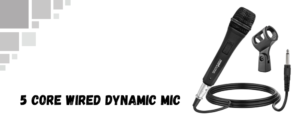
- Cardioid polar pattern for focused voice capture and noise reduction
- XLR output for stable, interference-free connectivity
- Frequency response tailored for vocal clarity and presence
- Durable metal housing built for live performance and touring
- Ideal for vocalists, karaoke, speeches, presentations
- Price: Approximately $25–$35 (varies by retailer)
Behringer SL85S Cardioid Dynamic Vocal Microphone
An affordable dynamic microphone tailored for vocal applications, featuring a cardioid pattern that minimizes feedback and background noise. The SL85S offers a crisp sound profile with a switchable low-cut filter to reduce handling noise and pop sounds. Built with a rugged metal construction, it suits live vocals, presentations, and recording tasks.
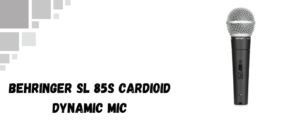
- Cardioid pickup pattern for efficient background noise rejection
- Low-cut filter switch to minimize rumble and popping
- Wide frequency response (50Hz – 15kHz) optimized for vocals
- Robust metal body suited for live use and durability
- Compatible with standard XLR connections
- Price: Around $45 at Sweetwater (subject to change)
Why These Stands and Bundles Make Testing Easier
A few inutes spent testing saves hours of second-guessing. If you’ve got a favorite test line or troubleshooting tip, share it—other creators are always hungry for that “why didn’t I think of that?” help. Happy recording!
Here you can also find amazing drum thrones; alternatively, browse our page to find the best keyboard bench, audio mixers, drum mics, piano bench, keyboard stand, speakers, party speakers, and more.