
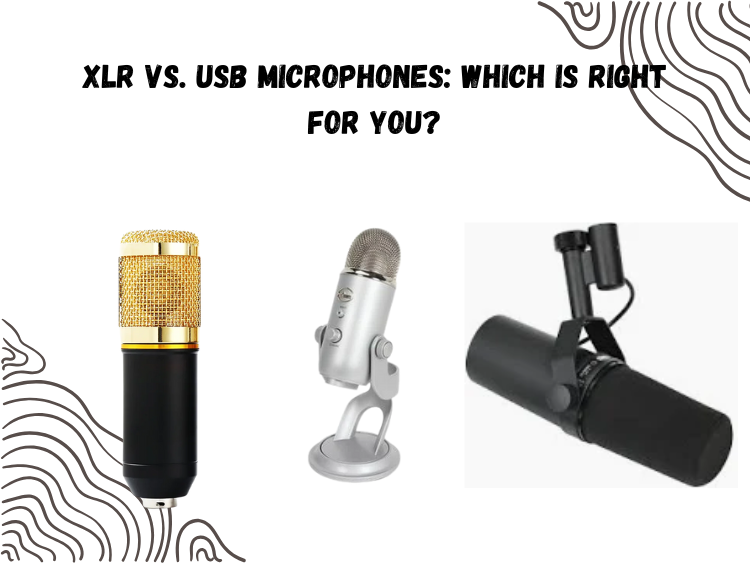
Ready to enter into the world of serious audio then. Perhaps you have a new podcast, home studio, or (long overdue) improvement to your Zoom mic. Next stop, one of the first choices you have to make is this: XLR or USB?
Both of these kinds of mics can sound fantastic. They are both employed by creators, musicians, and streamers daily. One of them will make your life much simpler and the other will simply take you more time, depending on your setup, goals and experience.
This article is not out to beat around the bush. You would like to understand which of them is better to you. Alright, so let us get to it.
USB Mics: Plug-and-Play Simplicity
USB microphones are exactly what they sound like. Plug them into your computer, and you’re recording in seconds. No interface. No mixer. No fuss.
That’s why USB mics dominate the beginner market. Whether it’s the Blue Yeti, the Audio-Technica AT2020USB+, or all-in-one kits like the REC SET Streaming Microphone Kit, the appeal is obvious:
- No need for a separate audio interface
- Often cheaper than a full XLR setup
But here’s what most USB mic reviews gloss over: simplicity comes at a cost.
You’re limited to one mic per computer in most cases. So if you’re podcasting with a guest in the room, you’re out of luck. Want to upgrade your audio chain with a preamp or compressor? Nope—USB locks you out of that.

Also, quality varies wildly. Some USB mics (like the AT2020USB+) sound almost identical to their XLR counterparts. Others have built-in hiss, bad drivers, or cheap internal preamps that muddy your voice. It’s hit or miss unless you pick the right one.
Still, for solo creators, gamers, or anyone just starting out, USB mics are a killer first step.
XLR Mics: Pro-Level Flexibility
XLR microphones are the industry standard. They’re used in studios, broadcast booths, and live sound for one big reason: control.
With an XLR mic, you’re not just buying the microphone. You’re buying into an ecosystem—one that includes an audio interface, a mixer, maybe even a rack-mounted preamp down the line.
That sounds complicated, but it’s what gives XLR its power:
- Better preamps = cleaner, richer sound
- Multi-mic recording is easy with an interface
- You control every part of your signal chain
- They scale with your setup as you grow

Take a dynamic broadcast mic like the Shure SM7B. It’s not even usable without a decent interface and gain booster. But when paired correctly, it delivers one of the smoothest, most natural vocal tones you can get. It’s also completely silent—no hiss, no USB noise, no latency issues.
The trade-off? XLR requires gear, cables, and sometimes a bit of learning. But if you’re committed to long-term recording—podcasts, music, serious streaming—it’s the setup that won’t limit you.
Head-to-Head: XLR vs USB
| Feature | USB Microphones | XLR Microphones |
| Setup | Plug and play | Requires interface/mixer |
| Portability | Great for travel | More gear to carry |
| Cost | Cheaper upfront | More expensive initially |
| Sound Quality | Good to great | Great to elite |
| Scalability | Limited | Highly scalable |
| Multi-Mic Support | Usually no | Absolutely yes |
| Latency/Monitoring | Built-in monitoring on most | Interface-dependent |
Which One’s Right for You?
Pick USB if:
- You’re just starting out and want zero hassle
- You record solo (YouTube, Twitch, voiceovers)
- Your budget is tight but you still want solid quality
- You want everything in one neat little box (hello, REC SET)
Pick XLR if:
- You’re building a long-term recording setup
- You plan to record multiple people or instruments
- You want to control every part of your sound
- You’re aiming for pro-level audio, full stop
Let’s make this real.
If you’re a beginner streamer in your bedroom, the REC SET Streaming Mic Kit gives you a great cardioid condenser mic, boom arm, shock mount, pop filter, and USB connection—all in one. That’s your best mic interface without needing to understand gain staging or phantom power.
But if you’re stepping into serious podcasting, working with guests, or want to upgrade to gear like the Rode Procaster, 5 Core Snare XP, or Shure SM7B, then XLR is the better move. You’ll get cleaner, broadcast-level sound—and you’ll be ready for future upgrades like compressors, EQs, and advanced routing.
One Final Note: Interfaces Matter
If you do go XLR, don’t cheap out on the interface. A low-end mic with a solid interface (like a Focusrite Scarlett or PreSonus AudioBox) often outperforms a great mic plugged into junk.
Your mic is half the battle. Your interface is the other half. It’s where tone, gain, and clarity live or die.
Final Verdict
XLR vs USB showdown: the battle has no universal victor. It is about application and not hype.
USB provides you with speed, convenience and reduced cost, all ideal to get you started. XLR provides you with power, control and space to expand.
The question to answer therefore is; do you need something that simply works in the present, or you can develop around in the future?
When you have the knowledge about that, it is easy to choose.